
Widgets
Habit tracking widgets for your Android home screen.
Four widgets, all free: Today, Habit, Habit history and Summary. Pick which habit each one follows, choose how it looks, and check habits off without opening the app.
Habit Tracker is currently available for Android.
Four widgets, all in the free plan
Plenty of habit apps keep widgets for paying users. Here they are part of the free plan, because a habit you cannot see is a habit you forget. Each widget has its own job:
- Today — every habit scheduled for today, in 4x2 or 4x4.
- Habit — one habit you choose, in 2x2 or 4x2.
- Habit history — the recent history of a single habit, in 2x2, 4x2 or 4x4.
- Summary — all habits together over a range you pick, in 2x2, 4x2 or 4x4.
Four looks for the Habit widget
The single-habit widget is the one most people keep on the first home screen, so it has four styles instead of one:
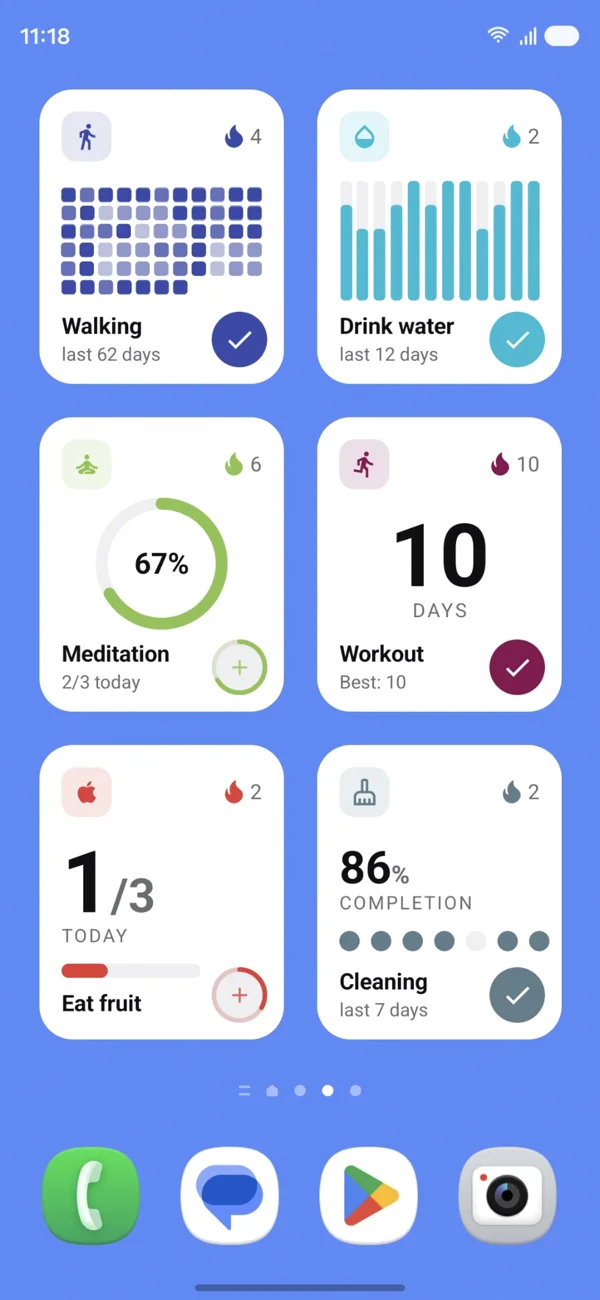
- Ring — the default, readable from day one.
- Number — a large streak count, best for simple done or not-done habits.
- Goal — progress towards a target, such as 5 of 8 glasses, with a bar.
- Grid — the recent period as a history grid.
You can place the same widget several times, each following a different habit, so a morning routine and an evening routine can sit on separate screens. The screen below runs six of them at once.
Checking off from the home screen
The circled check on each tile records the completion immediately, including quantitative habits, where the plus adds one to the logged amount. You do not need to open the app, and the change is waiting for you when you do.
Widgets work best with a small routine
A widget showing twelve habits is a to-do list, not a cue. Three visible habits on the home screen work better, which is exactly the shape of a simple morning routine or a simple evening routine.
If a habit does not happen every day, point the Habit widget at it and track a weekly target instead of fixed days, so the tile stays useful on the days the habit is not scheduled.
Questions
- Are the home screen widgets free?
- Yes. All four widgets — Today, Habit, Habit history and Summary — are part of the free plan. There is no widget behind the paywall.
- Can I check a habit off without opening the app?
- Yes. Tapping the action button on a widget records the completion straight away, and the app picks it up the next time you open it.
- How many widgets can I place?
- As many as you like, including several copies of the same widget pointed at different habits.
- What sizes are available?
- Today comes in 4x2 and 4x4. Habit comes in 2x2 and 4x2. Habit history and Summary come in 2x2, 4x2 and 4x4.
- Are widgets available on iPhone?
- The Android widgets ship today. The iOS version of the app is still in progress.
Try it on your own habits
Habit Tracker by Qbito is free on Android. Start as a guest, without an account, and set up your first habit in about a minute.
Habit Tracker is currently available for Android.