Quick answer: to track study habits when your timetable changes, set a weekly target in minutes and log each real study session. Choose a small total you can meet in an ordinary week, then review the total and the days you actually studied. A moved session still counts towards the same goal.
A daily study streak can look impressive until a late shift, a deadline or a family visit moves Tuesday’s session to Thursday. The work still happens, but the calendar says you failed. If your free hours move around, that is a poor measure of progress.
The better starting point is a weekly amount of focused work. It gives you room to move sessions without making the target meaningless. It also forces a useful decision: what, exactly, will you count as study?
How to track study habits across an uneven week
Start by choosing one course or subject and a weekly amount of time you can defend. For a busy beginner, 120 minutes might mean four half-hour sessions, two longer blocks or a mix. The number is a commitment to work, not a forecast of how motivated you will feel.
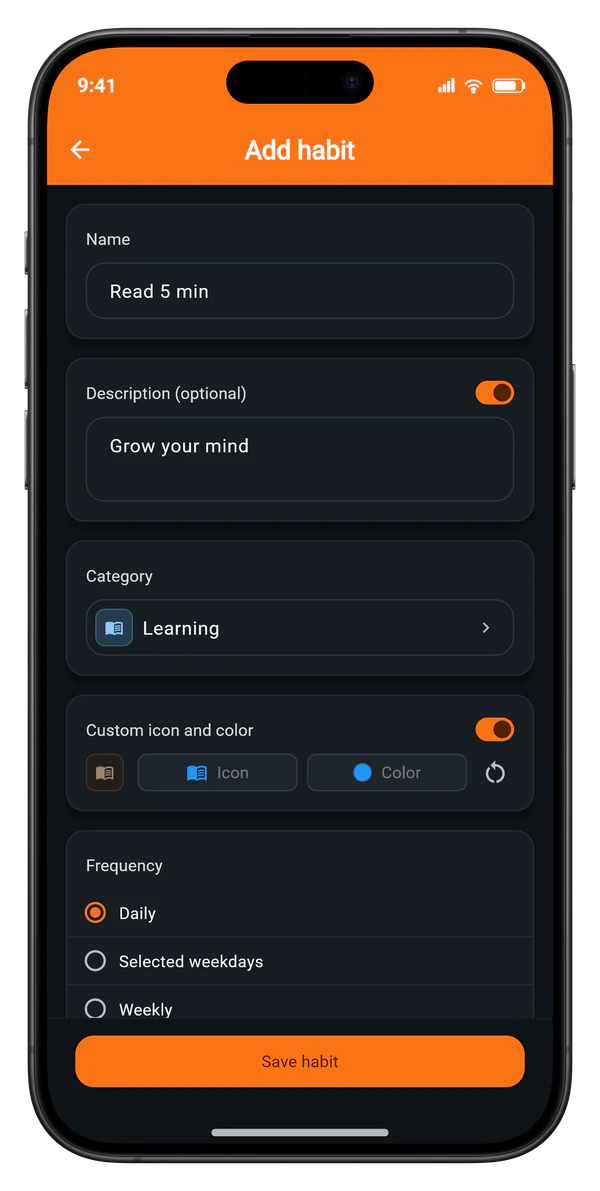
In Habit Tracker’s Add habit form, the Repeat row offers a weekly rhythm alongside daily and selected weekdays. The Goal section pairs a number with a unit; minutes and hours are among its 19 units. A habit called “Revise Spanish” with a weekly target of 120 minutes describes the job more clearly than a checkbox labelled “Study”. The app sums entries within the week, so a 20-minute session is progress even before the full target is reached.
Count attention, not time near a desk
Only log time spent doing the work: solving problems, drafting an answer, recalling material or checking mistakes. A 45-minute library visit with twenty minutes of scrolling is a 25-minute session. The tracker cannot make that distinction for you.
I would rather set a smaller honest target than a large target filled with background time. A weekly total becomes useful only when its units mean the same thing each time. If you study with a timer, stop it during long breaks; if you do not, round down instead of up.
When fixed weekdays are the better choice
A weekly target is a poor fit for a class that happens every Tuesday or a study group that meets on Thursday. Those events have a day attached. Use selected weekdays when missing that particular appointment is the thing you want to notice.
There is a practical reason to choose carefully at the start: once a habit has logs, the form locks changes to its rhythm so old entries do not suddenly sit under a different schedule. If you discover after a month that the rhythm is wrong, keep the history and start a new habit with the better schedule. The same distinction appears in tracking a habit three times a week without fixed days.
What a realistic study week looks like
Take Maya, who works changing shifts and sets “Revise Spanish” to 180 minutes a week. She studies for 30 minutes on Monday and plans another session on Tuesday. A late shift wipes that one out. She does 45 minutes on Wednesday, 20 on Friday, 60 on Saturday and 25 on Sunday. The app’s weekly count reaches 180 minutes across five entries.
Tuesday is empty, but the week met its target. Under a daily 30-minute plan, Tuesday and Thursday would both read as misses even though Maya did the planned three hours. That matters because the next week’s decision should be about whether 180 minutes helped her learn, not about defending two empty squares.
The example is deliberately ordinary. The 20-minute Friday session counts because Maya actually revised; it is not a consolation prize. If all five sessions consisted of rereading notes without testing her recall, however, the tracker would still show 180. A habit log measures repeated effort. Keep a separate course plan or practice test for what you have learned.
How many study reminders should you set?
For a weekly habit, Habit Tracker can use checkpoint reminders during the week. The standard weekly pattern is Thursday and Sunday: one chance to notice that the week is slipping, then one last prompt before it closes. That is more useful than a notification every evening for a habit you never meant to do every day.
If Thursday’s prompt arrives after a long shift, decide on a concrete next slot rather than promising to “study later”. Maya could reserve Saturday morning for 60 minutes while there is still space in the week. A reminder creates the opening; the calendar decision makes it usable. For daily routines, setting habit reminders without notification fatigue explains why adding more alerts often makes the problem worse.
How to review a study habit after two weeks
Wait for two complete weeks before changing the target. One difficult Wednesday says little. Two weeks show whether the number is plausible and where the work tends to land.
Open the habit’s statistics and look at the history and weekday breakdown. If the logged sessions cluster on Sunday, you may be running a weekly cram rather than a study routine. If Monday and Saturday carry most of the work and that pattern suits you, leave it alone. The weekday breakdown guide shows how to separate a scheduling problem from one bad day.
Adjust one thing at a time. A target you missed twice by a wide margin can come down; the number in the Goal section remains editable after you have logs. If the target was met but the work felt rushed, keep the minutes and change the type of session: fewer notes, more practice questions. Do not raise a target just because one exam week produced an unusually high total.
Keep the record through a disrupted week
Exams end. Courses change. Some weeks leave no room for study at all. An empty week is useful information when you look back, and deleting the habit removes the weeks that did work. In Habit Tracker, a paused habit keeps its history, and you can give the pause an optional date to resume.
If study stops for longer, use the short plan for restarting after a missed week before setting a bigger goal. Begin with one real session, log its actual minutes, and then decide whether the old weekly target still fits. A study habit earns its place by helping you return to the work, not by keeping every calendar square orange.